
ChatGPT Atlas: The AI Future Of Web Browsing

On October 21st, 2025, OpenAI (the company of ChatGPT) announced the release of their new web browser that revolves around ChatGPT.
Different AI tools like ChatGPT, Claude, Grok, and Gemini have given us a rare opportunity to change the way we browse and discover content on browsers like Chrome, Firefox, and Opera. ChatGPT is an AI powered browser that gives us the ability to have an artificial intelligent assistant that helps us acquire more information, answer questions, and complete tasks easier and quicker.
The Use
With Atlas, ChatGPT can help you anywhere on the web. On any page, you can simply ask ChatGPT about information on different tabs, all without switching between windows. ChatGPT’s memory is also built in, so it can remember previous conversations and documents. Yogya Kalra, a college student and an early tester of ChatGPT Atlas said, “During lectures, I like using practice questions and real-world examples to really understand the material. I used to switch between my slides and ChatGPT, taking screenshots just to ask a question. Now ChatGPT instantly understands what I’m looking at, helping me improve my knowledge and checks as I go."
As you use Atlas, ChatGPT gets smarter and more helpful. ChatGPT also remembers the context of previous tabs, searches, etc., and brings them into use when needed (e.g., Hey ChatGPT, make a quick summary of the acceptance requirements for all the colleges I researched in the past week.). Browser memories in Atlas are optional and are always under the user’s control. You can view or delete them at any time in settings, and deleting browsing history automatically removes any associated browser memories. ChatGPT can also do work for you in Atlas by using agent mode. It has improvements that make it faster and more efficient by working with your browsing context whether you’re researching, analyzing, automating tasks, planning events, or booking appointments.
The UI
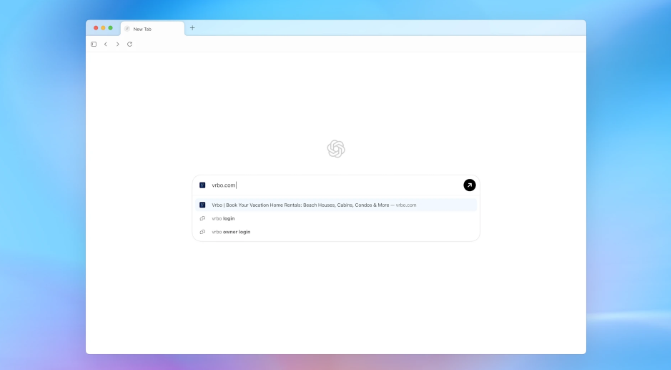
The new tab page is the starting line of any web browser. Atlas allows you to ask a question to ChatGPT and other sources or type a URL for fast results.

Atlas allows you to simply click “Ask ChatGPT” while in a tab to shorten, explain, or complete tasks in your window. ChatGPT is able to see the information on your page to help give better answers.

You’re also able to use ChatGPT to help you write by simply highlighting your text. It will give simple edits and suggestions.

Atlas also has a simple incognito mode that offers all the same features as normal Atlas, without your data being saved or tracked.

Atlas is built around you and can give personal suggestions, along with controlling tabs.
It does simple tasks such as ordering necessities for the family trip. You simply press “Ask ChatGPT,” and it tells you the essential items you need to buy. Furthermore, it will also pull information from previous shopping carts and automatically add the items needed to your cart.
What’s Next?
Atlas is already available on macOS and is expected to be released on Windows and IOS soon. If this app is successful, it might cause other famous browser companies like Google and Opera to release AI-focused browsers. We don’t know if Atlas will be successful, or if it’s healthy to use AI to do all your tasks (since that’s a part of being human!). It might cause students to cheat on work or adults to be lazy about basic priorities. You should try it! You might like it! But don’t get too lazy, and don’t use it for things you should be doing yourself.
Credits
ChatGPT — https://chatgpt.com/atlas


